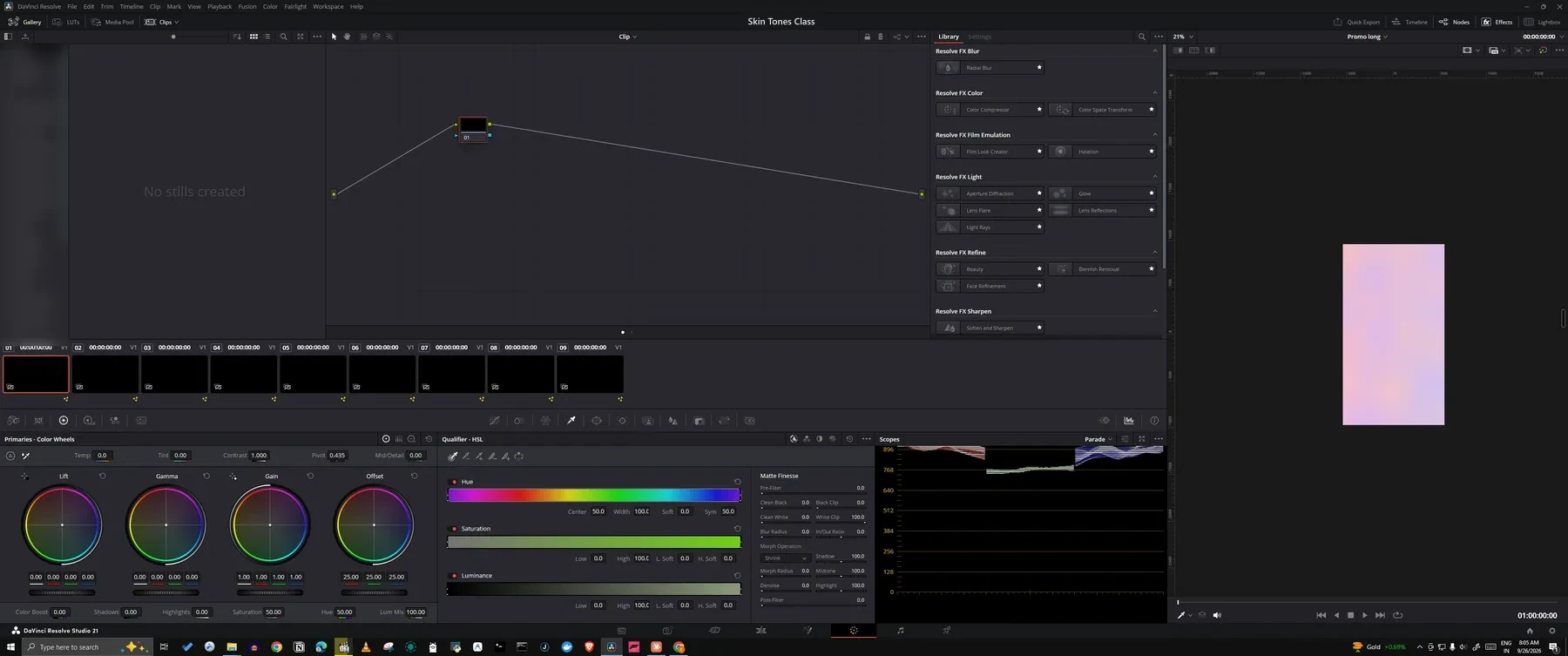
Auto-zoom
It zooms on every click, then eases out.
In a 3-hour class, not one zoom by hand. The motion is a very smooth ease-out, so students never feel it.
A screen recorder + editor for teachers and course creators. Smooth zoom, shortcut keycaps, chapters, Hindi captions and mistake cuts are ready the moment you stop recording. Works with DaVinci Resolve, your browser, Notion, Audacity and any other app you teach in.
Free from Microsoft Store · Windows 10 & 11 · On a Mac? Join the Mac waitlist →
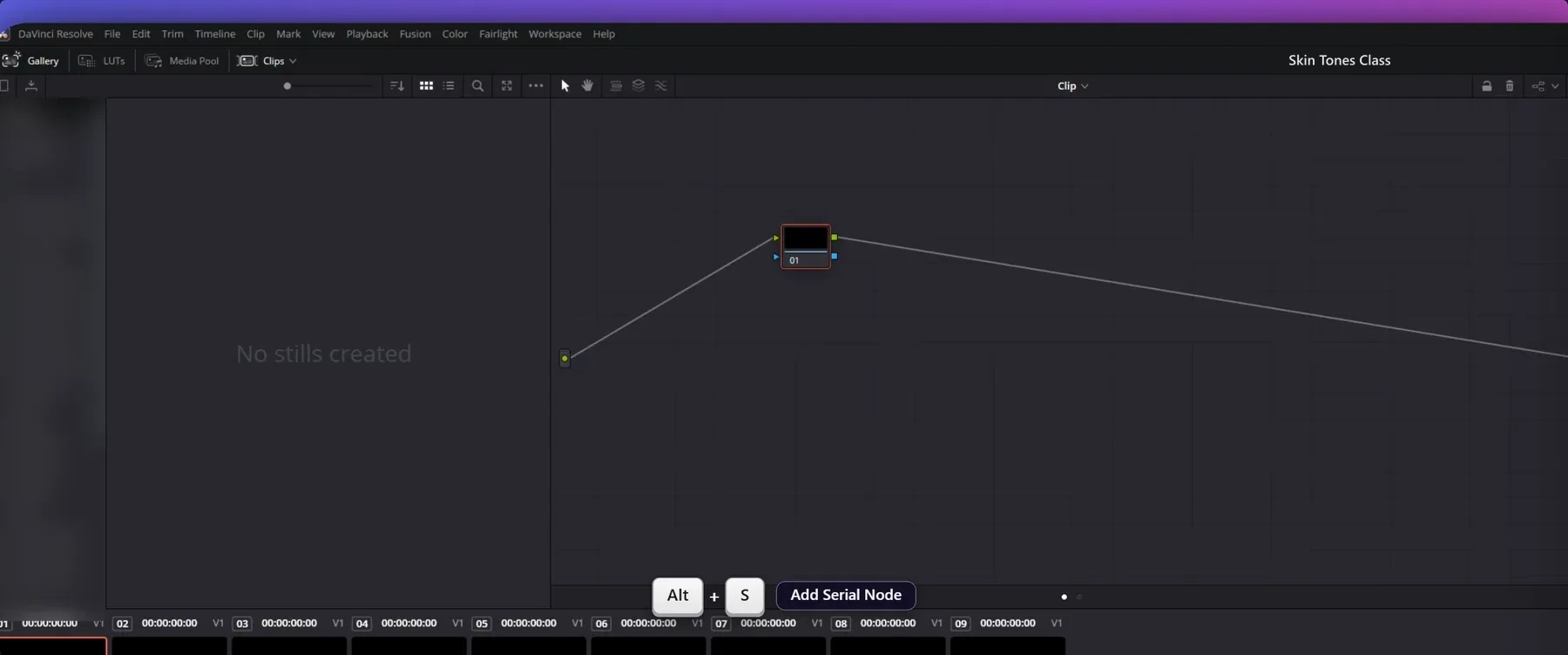
Your students can’t see what you’re pointing at.
Screenlark zooms in for them, automatically.
● The screen above and every screenshot below come from the real Screenlark app, not a mockup. DaVinci Resolve, Chrome, Notion and Audacity are trademarks of their owners and are shown only to demonstrate recordings.
* Measured on our test PC: RTX 2060, 3440×1440 ultrawide, Windows 10, Sep 2026. Your PC may differ.
The whole story, from a raw class recording to a finished lesson. It plays silently here. Click the screen for full screen and sound.
Every course creator’s timeline looks like this. The red clips are work that goes into enduring, not teaching.
Students see what the key does, not just the key. Screenlark recognises the app in front and shows the right name. Chrome, Edge, Notion and Audacity have names too. In any other app the shortcut still appears, and you can name any shortcut yourself. Pick an app:
Six things teachers notice first. The other 31 are one click below.
In a 3-hour class, not one zoom by hand. The motion is a very smooth ease-out, so students never feel it.
Students see what the key does. Recognises 14 apps and browsers.
On your PC, offline. Roman or Devanagari.
Mark a mistake while recording, remove it later.
Power cut or crash? The recording survives and opens as “Recording recovered”.
.fcpxml + markers + .srt straight into Resolve.
Give every student a copy watermarked with their name or code. Leak on Telegram? The code tells you who shared it.
Before you upload: resolution, aspect, length, captions, loudness.
A PDF with steps, screenshots and a shortcuts table for students. One video per chapter, each with its own .srt.
I teach DaVinci Resolve colour grading and record 1–3 hour classes. Screenlark started from my own pain: the crash fear, hunting mistakes, zooming by hand, typing Hindi subtitles. Every feature here came from a real class.— The teacher who built Screenlark · your feedback comes straight to me
Every feature, no card, no account. Pick a plan when your free period ends.
First 50 members
Cancel any time. Launch price.
Buy this planFounding members only share test diagnostics, never recordings. Terms · Launch prices may change later · Mac version coming: join the waitlist.
An honest side-by-side with the tools people usually ask about. Prices are in US dollars.
| Screenlark | Super Recorder | Screen Studio | Camtasia | Loom | OBS | |
|---|---|---|---|---|---|---|
| Windows | ✓ | ✓ + Linux | Mac only | ✓ | ✓ | ✓ |
| Mac | Coming soon | No | ✓ | ✓ | ✓ | ✓ |
| Price (USD) | ≈ $2.3/mo (₹199) · ≈ $15/yr (₹1,299) · 6 months free for Founding 50 | $9/mo · $245 lifetime · $5/week (export needs payment) | $29/mo, or $9/mo billed yearly ($108) | $179.88 – $599 per year | Free: 5 min, 720p. Business $18/mo | Free |
| Stays on your PC (no cloud) | ✓ | ✓ 100% local | ✓ + share links | ✓ | Cloud-first | ✓ |
| Auto zoom | ✓ ease-out glide | ✓ auto-follow | ✓ | Cursor effects | No | No |
| Shows your keystrokes | ✓ with action names | No | ✓ | ✓ keystroke callouts | No | Plugins only |
| Built-in editor | ✓ | ✓ | ✓ | ✓ | Basic, in cloud | No |
| Hindi captions | ✓ on your PC, offline | No | Local transcription | ✓ Hindi listed | ✓ Hindi listed | No |
| DaVinci Resolve timeline (.fcpxml) | ✓ | No | No | No | No | No |
| Mistake markers → one-click cut | ✓ | No | No | No | No | No |
| Named watermark copies per student | ✓ | No | No | No | No | No |
| Built for | Teachers & course creators | Product demos | Product demos | Training videos | Quick messages | Streaming, advanced setups |
Compared from each product’s public pricing and help pages, checked 1 Oct 2026. Prices change and differ by country, so please check the latest. Screenlark prices are launch prices in rupees, converted at about ₹86 to the dollar. All the others are good tools; Screenlark is built for one job, recording classes.
One button turns your caption transcript into chapter titles with a one-line summary each, added as chapter markers you can edit. It uses Claude and needs your own API key.
Only the transcript text is sent, never video or audio, and only when you click. If you never use it, nothing is sent and Screenlark stays fully offline.
Yes. The first 50 founding members get 6 months completely free, with no watermark and no card. The next members get 3 months free. After the free period, plans are ₹199 a month, ₹799 for 6 months or ₹1,299 for 12 months. You can always open and export your old projects.
Yes. Screen Studio is Mac only. Screenlark runs on Windows 10 and 11 with auto zoom, a smooth cursor, backgrounds and a built-in editor, and adds keycaps with action names, Hindi captions and DaVinci Resolve export. See the full comparison.
Only diagnostics, to test the software: which features you use, how long a render takes and where something failed. No recordings, no screen content. You can also send a report from inside the app with “Report a bug”. Read the terms.
No. Each PC gets one free period. The app sends a one-way code made from the PC (nothing personal) so a reinstall continues your original period.
No. Recording, captions, silence cleanup all run on your PC. No account, no upload. The only downloads are the caption models you choose to install. The one optional exception is the AI chapter-titles button: if you add your own Claude API key and click it, the transcript text (never video or audio) is sent to Claude. Nothing is sent otherwise.
There is a “Low-end laptop” profile. With an NVIDIA card, NVENC makes recording and export faster. Without one, the software encoder starts on its own.
Windows 10/11 is ready now. The Mac version is being tested. Choose “Mac” in the download form and you will hear first.
No. Shortcut names also show for Premiere, After Effects, Photoshop, Blender, Excel, VS Code, Figma, TallyPrime and more. There are website-demo and general-tutorial profiles too. See the DaVinci, Chrome, Notion and Audacity pages for details.
Recordings, captions and projects stay on your PC. The website only stores the email you give for the download. Read the privacy policy.
Screenlark is now live on the Microsoft Store. Free download for Windows 10 & 11.
Official release · Verified by Microsoft · Automatic background updates
Want early-user benefits, video guides or direct updates? Leave your email:
Windows 10 / 11 · Mac version coming (join the waitlist below) · Privacy policy
Screenlark is Windows-only today. Leave your details and you get 3 months free to test the Mac version when it is ready.
Used only to tell you when the Mac version is ready. Privacy policy